Revise an Advanced Search without losing the original criteria
The latest NetDocuments upgrade introduced changes to the Advanced Search, including the filtering options that appear to the left of the search results.
Also, when you click Advanced Search a second time, the prior criteria is now cleared from all fields.
But what if you want to keep that criteria for your next search?
Here’s how to do it:
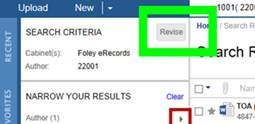
After performing a search, click the Revise button located above the filtering options. This will take you back to the Advanced Search screen with prior criteria.
Submitted by Tina Rodriguez
Foley & Lardner LLP