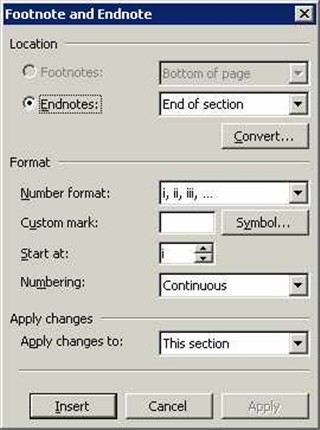
By default, Word places endnotes at the end of the document, which is what most of us want. But you're not stuck with that arrangement. Word will position endnotes at the end of a section, if you tell it to. Most of us won't ever need this much flexibility, but if you do, you'll appreciate this feature.
Here's how to position endnotes at the end of a section, instead of at the end of the document. NOTE that you can do this to go at the end of a Section or at the end of the Document.
- From the Insert menu, choose References and then select Footnote.
- In the resulting Footnote and Endnote dialog box, click the Endnotes option.
- Choose End of Section from the Endnotes dropdown list.
- Click Apply.