Some Useful Styles Tools
Apply Styles Pane
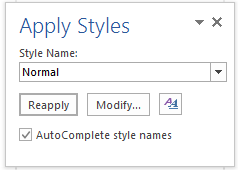
This little box is quick to access, doesn’t take much screen real estate, and supplies a multitude of tools for working with Styles in Word. Simply press CTRL + SHIFT + S to bring it up.
- After the pane appears, start typing a style name and press the Enter key to apply the desired style when it appears in the Style Name You can also use the drop-down menu to select a style and apply it.
- Pressing CTRL + SHIFT + S while the pane is open will highlight the style in the Style Name field, allowing you to type another style name to apply.
- Click into any paragraph in your document. The style applied to it displays in the Style Name
- Use the Reapply button to wipe out direct formatting that has been placed on top of a styled paragraph and reapply the style listed in the Style Name
- Use the Modify button to make quick edits to a style on the fly.
- Click the Styles button to open the larger Styles Task Pane.
Classic Style Gallery
The classic Style Gallery can be added to the Quick Access Toolbar for quick access to the long list of styles available as shown below. After finding a style in the list, simply click it to apply it to a single paragraph or multiple selected paragraphs.
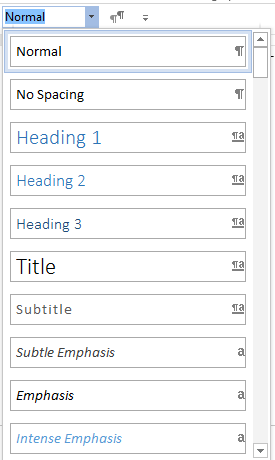
To add the Classic Style Gallery to your Quick Access Toolbar (QAT):
- Click the Customize Quick Access Toolbar arrow at the right end of the QAT.
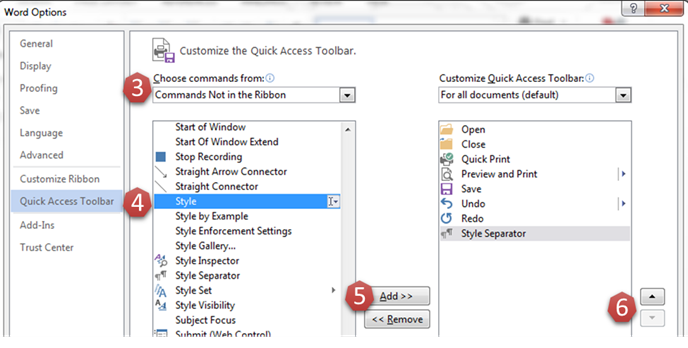
- Click More Commands… to open the Word Options dialog (shown below).
- Select Commands Not in the Ribbon from the Choose commands from: drop-down menu.
- Locate and select Style from the alphabetical list of commands.
Note: It will display Style (Style Gallery Classic)
when you hover over it.
- Click the Add
- Use the arrow buttons to position the Classic Style Gallery on your QAT.
- Click OK to close the Word Options dialog and save your change.
#HelpDeskandUserSupport